
The Great Desktop Divide of 2026: WhyGNOME 50 and KDE Plasma 6 Are No Longer True Competitors

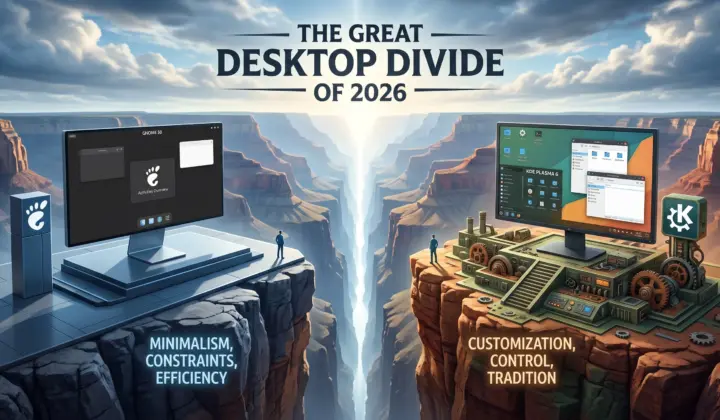
Hey everyone, Eyad here! Welcome back to ComputerJy World.
Just a few days ago, I shared a little secret with you: choosing a Linux distribution is a massive trap. It’s not about the distribution itself, but rather the interface you sit in front of all day—the Desktop Environment (DE). If you missed that post, go read it now (I’ll wait).
Now that we’ve established that your desktop environment is what actually shapes your daily computing life, let’s address the elephant in the open-source room. If you look at the Linux landscape today in 2026, two absolute titans dominate the discussion: KDE Plasma and GNOME.
For years, the conventional wisdom was simple: if you wanted a clean, distraction-free workflow, you went with GNOME. If you wanted a traditional layout and endless dials to turn, you chose KDE Plasma.
But in 2026, that old framing is completely dead.
With the recent releases of GNOME 50 (Tokyo) in March 2026 and KDE Plasma 6.6, these two projects have diverged so radically in architecture, design, and target audience that they aren’t even competitors anymore. They are two entirely different software philosophies trying to solve two entirely different problems.
So, which philosophy aligns with your digital soul? Let’s crack open the hood and see what’s going on.
1. The Philosophical Divide: “The Invisible Hand” vs. “Give Me the Reins”
At its heart, this is a clash between intentional constraints and infinite control.
GNOME 50: The Streamlined Appliance
GNOME treats your operating system like a polished kitchen appliance: it works beautifully, but only on its terms. Its signature feature is the Activities Overview, which sweeps away traditional desktop concepts. There are no desktop icons by default, no visible taskbars, and no minimize/maximize buttons to clutter your view.
You press the Super key, search for your app, drag it into a workspace, and get to work. Once you internalize this workflow, the interface essentially disappears. It’s a minimalist’s dream—focused, distraction-free, and incredibly cohesive. But if you don’t agree with the GNOME team’s design choices, there is very little middle ground.
KDE Plasma 6.6: The Infinite Canvas
KDE Plasma is built on a completely different premise: the user knows best. Out of the box, Plasma feels safe and comfortable. It gives you a highly polished, traditional desktop metaphor—a bottom taskbar (panel), an app launcher on the left, and a system tray on the right. If you are migrating from Windows, it feels instantly like home.
But right-click that bottom panel, and you unlock a cockpit of absolute control. You can move panels to any edge of the screen, swap widgets (Plasmoids), tweak animation speeds, and adjust window rules down to the individual pixel. It doesn’t force a workflow on you; it expects you to build your own.
2. Technical Milestones: Tokyo’s “Wayland-Only” Wall vs. Plasma’s “Plumbing Payoff”
The year 2026 has brought some massive technical shifts, particularly in how these DEs handle the modern display server: Wayland.
| GNOME 50 | KDE PLASMA 6 |
|---|---|
|
|
GNOME 50 “Tokyo”: Burn the X11 Boats
When GNOME 50 launched in March 2026, it made a historic, uncompromising technical call: Wayland only. The native X11 session has been entirely removed.
While legacy X11 apps still run fine through the XWayland compatibility layer, you cannot log into a native X11 GNOME session anymore. For 95% of users with modern hardware, this is great—it means a faster, more secure desktop. But for system administrators relying on remote X11 forwarding or people on highly specific legacy hardware, GNOME 50 isn’t an upgrade; it’s a solid brick wall.
Aside from display changes, GNOME 50 brings amazing polish:
- Papers: The new document viewer supports proper, fluid PDF annotations (highlights, drawings, and comments).
- Nautilus: The Files app is noticeably faster and lighter on memory.
KDE Plasma 6.6: The Payoff for Years of Plumbing
KDE has been doing the hard, invisible architectural work to make Wayland perfect. With the recent releases, KWin (Plasma’s window manager) separated its X11 and Wayland codebases, allowing Wayland development to accelerate like a rocket.
Because of this “plumbing” payoff, Plasma now boasts:
- Explicit Synchronization: Working in tandem with the Wayland protocol and NVIDIA’s 555+ drivers, explicit sync has completely killed the flashing, flickering, and stuttering that used to plague NVIDIA users on Wayland.
- Smart Selective Triple Buffering: KWin selectively triple-buffers only when it predicts a heavy scene will miss a screen refresh, keeping animations buttery smooth without permanently increasing input lag.
- Color & HDR Wizardry: Full integration of the Wayland color-management protocol and a native HDR calibration wizard directly in display settings. It is currently the only viable choice for HDR gamers and creators on Linux.
And yet, KDE did all of this without forcing users off X11. If you need an X11 session for work, KDE respects that choice and keeps it available.
3. Customization: Natively Built-In vs. The Extension Band-Aid
How do you add features to your desktop? This is where the user experience differs dramatically.
| KDE PLASMA 6 | GNOME 50 |
|---|---|
|
|
In KDE Plasma, customization is a first-class citizen. It has over 500 configurable settings. If you want a new widget, a custom dock, or a different window theme, you search for it directly inside the system’s “Discover” software center. The APIs are stable, and your widgets won’t suddenly self-destruct when Plasma updates.
In GNOME, native customization is deeply restricted. The settings app gives you roughly 180 options, and to do anything basic (like adding a dock or a system tray indicator), you have to turn to GNOME Extensions.
Extensions are incredibly powerful JavaScript patches that inject code directly into the shell. However, because they hack the shell directly, they notoriously break with almost every major GNOME update. Relying on extensions often feels like placing a band-aid on an open wound—you’re constantly waiting for third-party developers to update their code so your desktop doesn’t crash.
4. The 2026 Benchmarks: The RAM vs. GPU Performance Nuance
Let’s bust some decades-old myths. For years, people claimed KDE was a resource-hogging monster and GNOME was the lightweight savior. In 2026, independent benchmarks on modern hardware tell a completely different story:
| GNOME 50 | KDE PLASMA 6.6 |
|---|---|
|
|
- Memory (RAM): GNOME 50 takes the win here. It sits leaner at idle, using roughly 2.1 GB of RAM compared to KDE Plasma’s 2.6 GB. If you are running on an older laptop with constrained memory (8GB or less), GNOME’s lighter footprint is a genuine advantage.
- GPU Throughput (Gaming & Creator Workloads): Here, the table flips. Thanks to KWin’s direct synchronization optimizations and its ability to suspend composition effects for full-screen apps, KDE Plasma consistently beats GNOME 50 in graphics benchmarks. Running Unigine Heaven at 1080p on identical hardware, Plasma averages 33 FPS compared to GNOME’s 31 FPS.
- Battery Life: It’s a dead heat. Both environments sip identical power under normal video playback workloads, averaging a very respectable 12% battery drain per hour.
5. Unique Killer Features
Sometimes it’s not about the settings; it’s about that one tool you simply can’t live without.
- KDE Connect (Plasma): This remains one of the most brilliant pieces of software in the open-source world. It seamlessly bridges your Android phone and your desktop over the local network. You can sync clipboards, send SMS, use your phone as a trackpad, and transfer files instantly—without any cloud accounts or third-party servers. GNOME has online account integrations, but nothing that matches this level of local magic.
- Advanced Window Tiling (Plasma 6.4+): Plasma now lets you set entirely different window-tiling layouts for each virtual workspace natively. You can have a three-pane coding grid on Workspace 1, a floating layout on Workspace 2, and a simple split-screen on Workspace 3. No extensions required.
- Gnome Online Accounts (GNOME): If you live in Google Drive, Microsoft 365, or Nextcloud, GNOME integrates your cloud calendars, emails, and drive storage directly into the core shell and Nautilus file manager beautifully and effortlessly.
Eyad’s Verdict: Which Desktop Should You Boot in 2026?
Because these desktops are no longer competing to do the same job, your choice boils down to how you interact with your machine:
- Choose GNOME 50 if you want a set-it-and-forget-it appliance. If you spend 90% of your day inside a web browser or a terminal, and you want a clean, visually stunning, modern interface that gets completely out of your way without you having to configure a single slider, GNOME is pure bliss. It is also the undisputed industry standard for touchscreens and accessibility.
- Choose KDE Plasma 6.6 if you want your operating system to adapt to you, rather than you adapting to it. If you are a power user, developer, or Linux gamer who demands absolute control over your window management, values cutting-edge HDR/VRR graphics performance, and loves the magic of tools like KDE Connect, Plasma is an evergreen powerhouse.
So, what’s your pick? Are you a minimalist GNOME vibe-enthusiast or a hyper-productive KDE Plasma tweaker? Let me know in the comments below! 👇
Written by Eyad Salah
Founder of ComputerJy World, sharing tech tips, software tools, and digital insights since 2007. Passionate about modern web architecture and user experience.
Related Articles
Discussion (0)
Powered by WordPress✍️ Leave a Thought
Your email address will not be published. Required fields are marked *