

I switched from Konsole to Kwi before Kwi even had a version number. I’ve been using it since the early nightlies, and I love it. On November 20, KDE published Kwi 0.1, its first release, and confirmed that it had passed review to become an official KDE project.
A GPU-accelerated terminal sounds like overkill if you mostly open one to run git status. What makes Kwi interesting to me is that KDE built something with a modern terminal engine that still feels like it belongs on Plasma.
What Kwi 0.1 Gets From Ghostty
A terminal emulator is the window where you interact with a shell such as Bash. It takes what your shell and command-line apps send back and works out what should appear on screen, down to the color of a character and where the cursor goes.
Kwi borrows that part from Ghostty, through a library called libghostty-vt. Kwi draws the result itself, using Qt’s rendering system and your graphics processor through Vulkan or OpenGL. The menus, tabs, and settings use KDE’s Kirigami interface toolkit, which is why the app looks at home next to other recent KDE apps.
That division of work matters most when there’s a lot to draw. Think of a terminal dashboard refreshing several times a second or a build filling the screen with logs. The GPU helps draw those updates. The compiler still has the same amount of work to do.
There’s a longer-term reason to care, too. KDE developers can embed Kwi’s terminal component in apps built with Qt Quick, the same UI technology Kwi uses. The standalone app is what you can try today. The reusable component is the part I’ll be watching.
The Small Changes You’ll Actually Notice
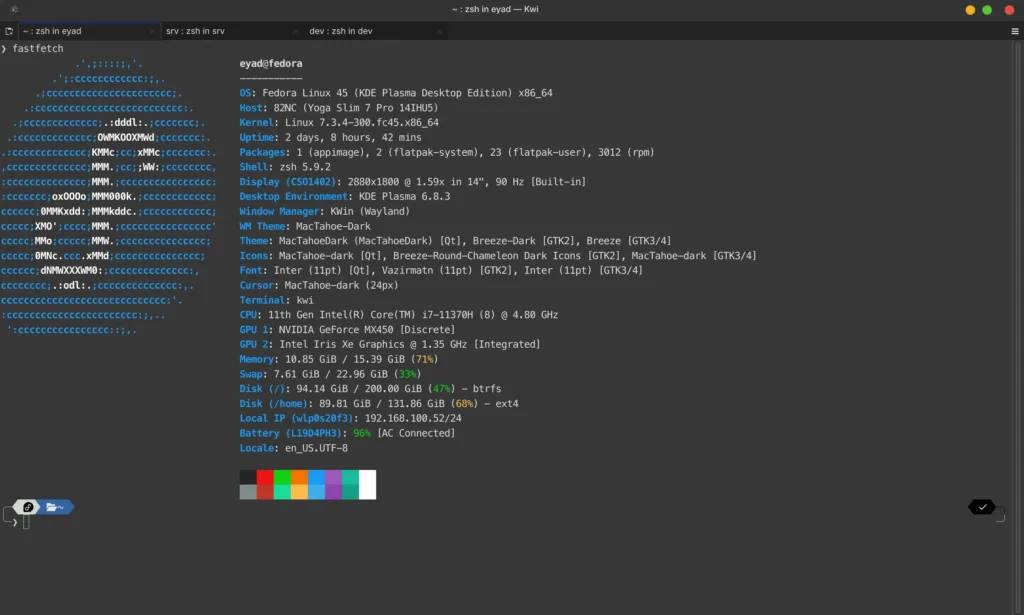
The release has an option to hide the tab bar when you only have one tab open. With several tabs open, Ctrl+Tab now cycles through them in the order you last used them. If you’ve ever opened a few extra tabs and then immediately wanted to get back to the one you were just in, that order makes sense.
Link detection is better, too. Kwi shows when you’re hovering over a link, and opening it takes Ctrl plus a click by default. You can change that in Settings. You can also scroll a line at a time with Shift+Up or Shift+Down, and choose a color scheme for the window separately from the colors inside the terminal.
Should You Try It Now?
If you use Plasma and spend most of your terminal time in tabs, I’d give it a go. The first release is available on Flathub, so you can install it alongside Konsole and see how your usual shell, shortcuts, and colors feel in it.
If you routinely keep a server running on one side of a window and its logs on the other, keep Konsole handy. Kwi’s built-in split panes are still in development. Translation work is also just getting started.
I switched while Kwi was still a nightly. With 0.1 out, you can give it one ordinary afternoon. Open the projects you usually open, use the shortcuts your fingers already know, and see which terminal you reach for the next day.