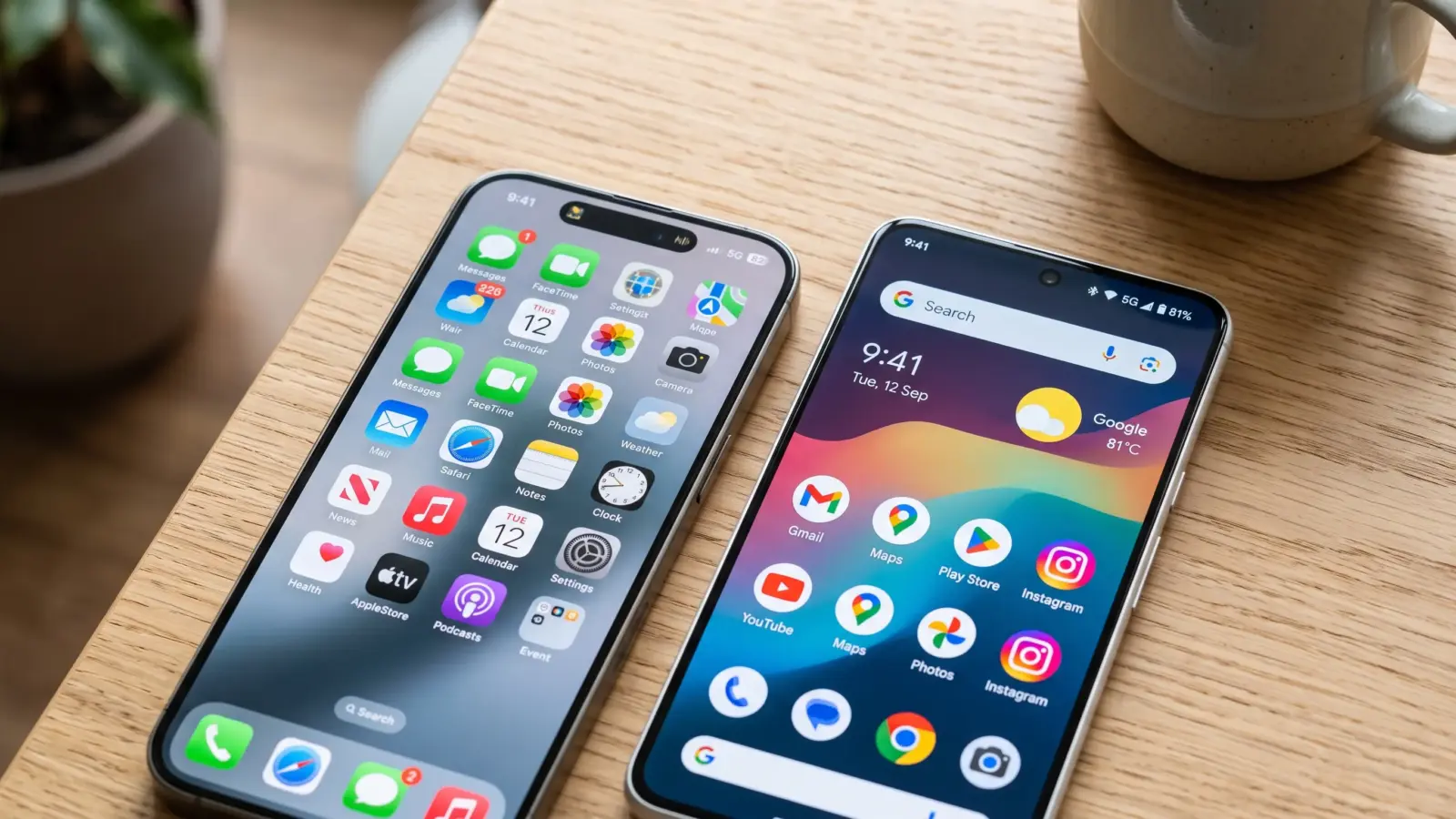

Early smartphone tribalism was simple. You either bought an iPhone because you valued end-to-end design polish, or you bought an Android device because you wanted a terminal emulator, a root shell, and an filesystem you could actually touch.
The battle lines in the iOS vs Android war were ideological. One was a cathedral; the other was a bazaar.
Nearly two decades later, that clean philosophical boundary has collapsed. Apple quietly absorbed Android’s best utility features—widgets, custom lock screens, notification grouping, and eventually USB-C under regulatory duress. Meanwhile, Google spent years boxing Android into stricter permission sandboxes, deprecating storage access APIs, and locking core operating system capabilities behind proprietary Google Play Services.
Both platforms have arrived at a state of functional convergence, but the technical trade-offs under the hood remain fundamentally different. If you care about silicon efficiency, OS longevity, low-level execution control, and on-device machine learning, here is how both stacks compare historically, architecturally, and right now.
The Evolutionary Arc (2007 to Present)
| Era | iOS (Darwin / Cocoa Touch) | Android (Linux / ART) | Paradigm Winner |
|---|---|---|---|
| The Genesis (2007–2010) | Smooth 60fps capacitive UI, no copy-paste initially, strictly sandboxed apps, App Store launched in 2008. | Andy Rubin’s keyboard-centric OS pivoted to touch; wild west fragmentation, intent system, notifications tray. | Tie: iOS won responsiveness and polish; Android won functional utility. |
| The Material vs. Flat Shift (2011–2016) | iOS 7 abandoned skeuomorphism; introduced 64-bit A7 chip years ahead of the industry; Apple Pay rolled out. | Android 4.0 Holo evolved to Android 5.0 Material Design; Dalvik replaced by ART runtime; Google Play Services decoupling begun. | iOS: 64-bit silicon caught Qualcomm off guard; iOS app ecosystem matured faster. |
| The Lock-In Era (2017–2021) | Gesture navigation (iPhone X), strict background task limits, App Tracking Transparency (ATT) devastated ad networks. | Project Treble tackled updates; high-refresh OLED displays adopted early; multi-camera computational photography pioneered. | Android: High-refresh displays and fast charging dominated raw hardware usability. |
| The Convergence Era (2022–Present) | DMA-mandated alternative app stores in EU; RCS messaging integrated; home screen grid locks broken; Apple Intelligence announced. | Up to 7-year OS update commitments from Google and Samsung; Gemini Nano integration; desktop windowing modes standardizing. | User: Both systems adopted the other’s best ideas out of market necessity. |
Architectural Divergence: How Code Actually Executes
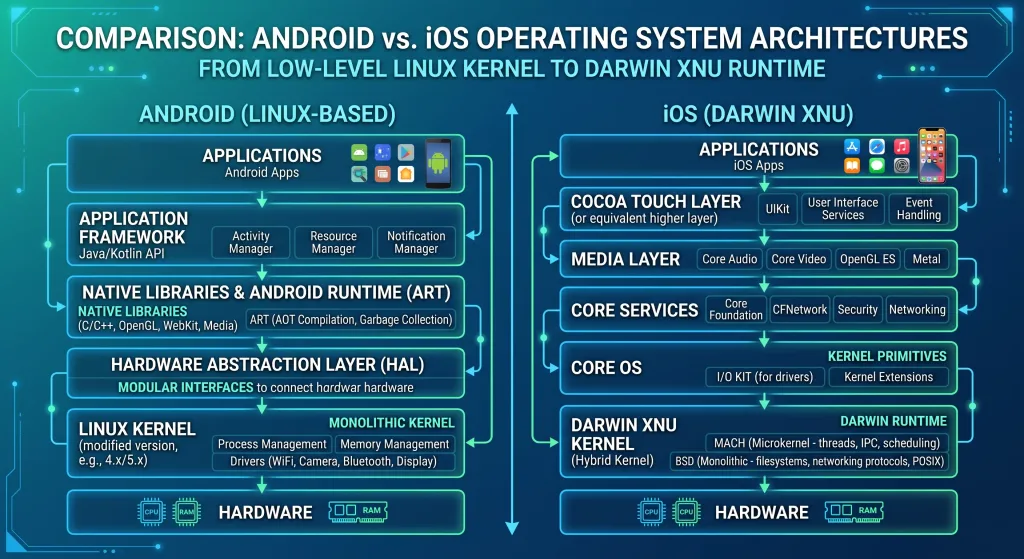
The surface-level UI differences between iOS and Android matter far less than the engines driving them.
Native Compilation vs. Managed Runtime
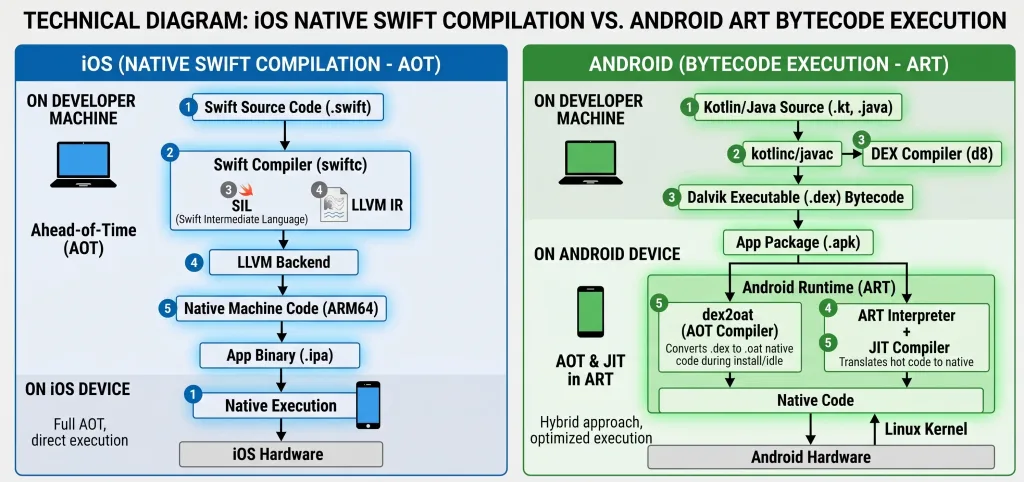
iOS compiles Swift and Objective-C directly down to bare-metal ARM machine instructions. Memory management does not rely on a background garbage collector. Instead, Apple uses Automatic Reference Counting (ARC) at compile time. This eliminates systemic memory spikes and garbage collection pauses, which is why an iPhone with 6 GB of RAM historically matched or outperformed an Android device packing 12 GB under load.
Android applications compile to Java bytecode and execute through the Android Runtime (ART). ART uses an Ahead-of-Time (AOT) and Just-in-Time (JIT) profile-guided compilation model. While modern ART compilation is remarkably fast and garbage collection latency has dropped to sub-millisecond levels, it still incurs runtime overhead that native binary execution simply avoids.
[iOS Pipeline]
Swift/Obj-C Source ---> LLVM Compiler ---> Native ARM Mach-O Binary ---> Direct Execution

[Android Pipeline]
Kotlin/Java Source ---> D8/R8 Dexer ---> DEX Bytecode ---> ART (JIT/AOT Profiled) ---> Machine Code
Background Processing and Thread Management
Apple’s approach to background tasks is draconian: kill them before they consume power. Background execution in iOS is delegated through strict, system-managed APIs such as BackgroundTasks framework, URLSession background transfers, and Apple Push Notification service (APNs). Apps do not run freely when minimized; they take a snapshot, enter a suspended state, and freeze memory.
Android gives developers significantly more rope. Foreground services allow persistent background computation provided a persistent notification informs the user. While Google has tightened the reins with Doze mode and App Standby Buckets, Android remains the only platform of the two where you can reliably run a self-hosted background sync service, a local torrent client, or a packet analyzer without the OS terminating the process five minutes after screen-off.
Low-Level System Matrix
| Dimension | Apple iOS | Google Android (AOSP + GMS) |
|---|---|---|
| Base Kernel | XNU (Mach + FreeBSD components) | Linux LTS kernel (moving toward GKI) |
| App Execution | Direct native compilation via LLVM | Bytecode via Android Runtime (ART) |
| Memory Architecture | Automatic Reference Counting (ARC) | Garbage Collection (Generational CMS / Concurrent) |
| Inter-Process Comm (IPC) | XPC services, strictly permissioned | Binder IPC driver (high-performance kernel-level) |
| Audio Latency Stack | CoreAudio (consistent <10ms round-trip) | AAudio / Oboe (hardware-dependent, ~15–30ms) |
| Peripheral I/O | Sandboxed USB host support; strict MFi/driver access | Generic USB OTG, USB audio class compliance, serial drivers |
Hardware Integration, Thermals, and Silicon
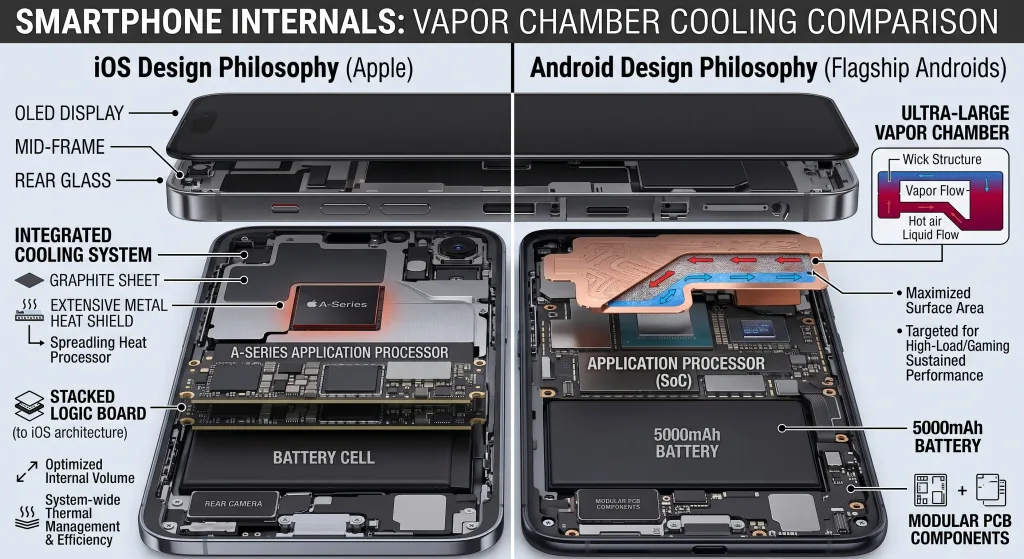
For nearly a decade, Apple Silicon held an undisputed lead in instructions per clock (IPC) and thermal efficiency. Apple controlled the tape-out process, reserving TSMC’s latest lithography nodes a full generation ahead of the rest of the industry.
That gap is no longer an insurmountable moat. Qualcomm’s custom Oryon cores in the Snapdragon platform, combined with MediaTek’s aggressive Dimensity chips, have closed the IPC deficit. In sustained graphical compute, flagship Android hardware regularly outperforms comparable iPhones thanks to larger thermal vapor chambers and more aggressive chassis heat dissipation.
Technical Reality Check: Apple designs thin chassis tuned for burst workloads—launching apps, capturing 4K ProRes video, or rendering brief computational frames. Android gaming flagships prioritize sustained thermal envelope management, sacrificing peak aesthetic thinness for vapor chambers and sustained framerates.
Where Apple retains an edge is unified memory architecture. By placing high-bandwidth unified RAM immediately adjacent to the CPU and GPU dies, the operating system can run high-parameter on-device neural models without shuttling memory across a system bus.
Ecosystem Mechanics: Sandboxes, Sideloading, and Interop
If you view your device as a modular component in a broader compute stack, the contrast between the two operating systems becomes stark.
File Systems and Data Ownership
Android gives you access to a real directory tree. Scoped Storage has imposed file-access guardrails in recent versions, but with user consent, file managers can still read and write directly to internal partitions, mount Samba network shares, or direct local downloads into custom directory structures.
iOS treats the file system as an abstraction. The Files app is an aggregate viewer for isolated app sandboxes and cloud storage providers. Direct, arbitrary access to system partitions without an exploit remains impossible.
Sideloading and App Distribution
- Android: Sideloading has worked since version 1.0. Enabling “Install unknown apps” allows you to deploy APK or APKS packages from alternative repositories like F-Droid, run open-source software, or test debug builds over ADB.
- iOS: Outside the European Union (where the Digital Markets Act forced Apple’s hand to allow alternative app marketplaces), you are limited to the official App Store, TestFlight betas with strict developer seat limits, or a weekly 3-app sideloading dance via self-signed developer certificates using AltStore.
[Android Distribution]
Developer ---> Raw APK ---> Direct User Download / Third-Party Store ---> Native Install

[iOS Distribution (Global)]
Developer ---> App Store Connect ---> App Review Gate ---> Signed Binary ---> User Download
The Practical Trade-Off Matrix
| Category | iOS Advantage | Android Advantage |
|---|---|---|
| Longevity & Resale | Predictable residual trade-in value; consistent multi-year performance. | Google and Samsung now guarantee 7 years of full OS updates on flagships. |
| Privacy & Security | App Tracking Transparency; hardware-enforced Secure Enclave; closed review pipeline. | Open-source upstream code auditing (AOSP); ability to de-Google via GrapheneOS or CalyxOS. |
| Customization | Consistent UI typography; polished lock-screen widget aesthetics. | Custom launchers, default app overrides, split-screen multitasking, system icon packs. |
| AI Integration | Private Cloud Compute architecture; deeply contextual on-device indices. | System-wide multimodal assistants; superior raw text processing and transcription models. |
| Repair & Diagnostics | Diagnostic software available, though component serialization remains strict. | Modular internal layouts on specific hardware; less software-level parts pairing. |
Recent Shifts: Where the Platform War Stands Today
The most fascinating shift in recent years is not what divides these operating systems, but how regulators and market exhaustion have forced them together.
The Death of Messaging Fragmentation
Apple’s adoption of RCS (Rich Communication Services) alongside iOS 18 neutralized one of the most effective consumer lock-in mechanisms in North American tech history. While SMS fallbacks remain for unsupported networks, modern cross-platform messaging now supports read receipts, typing indicators, and high-resolution media without relying on third-party clients like WhatsApp or Signal.
On-Device Artificial Intelligence
Both platforms are racing to solve the same computational bottleneck: running multi-billion-parameter models directly on low-power mobile silicon.
Google’s strategy leverages Gemini Nano directly embedded into Android system components, handling real-time audio transcription, screenshot querying, and contextual summarization.
Apple’s counter-strategy focuses on a hybrid architecture: localized requests hit the on-device neural engine, while complex inference routes to Apple’s Private Cloud Compute—a server architecture built on custom Apple Silicon running a hardened, auditable subset of macOS.
Frequently Asked Questions
Which operating system offers lower audio latency for production?
iOS remains the industry standard for mobile audio production. Apple’s CoreAudio framework operates at a low level within the Darwin kernel, offering consistent round-trip latency below 10 milliseconds. Android’s audio stack has improved significantly via the AAudio and Oboe libraries, but hardware variance across OEMs results in variable audio latency that challenges real-time software synthesizers.
Can Android match the software lifespan of an iPhone?
Yes, on specific flagship hardware. Google (with the Pixel line) and Samsung (with the Galaxy S series) both offer up to 7 years of major Android version updates and security patches. This matches or slightly exceeds Apple’s typical historical window of 5 to 7 years of active iOS support.
Does sideloading compromise device security?
Sideloading introduces an intentional bypass of automated repository malware scanning. On Android, installing apps outside Google Play requires explicit user permission per-source, and Google Play Protect can still scan side-loaded binaries for known exploits. Security depends on source verification: installing a verified build from an open-source repository carries a different risk profile than installing a modified pirated APK from an untrusted web forum.
Why does iOS require less RAM than Android?
iOS does not use runtime garbage collection. Applications compile directly to native machine code and rely on Automatic Reference Counting (ARC). Android’s runtime utilizes garbage collection cycles that require spare memory buffers to clean up unused memory without freezing the interface, necessitating higher physical RAM allocations to maintain equivalent multitasking performance.