

Ubuntu 26.04 quietly swapped two of the oldest pieces of Linux for Rust rewrites: sudo and the core commands like ls and cat. That got people arguing about whether rewriting decades-old tools is wise.
You can skip that argument and still get the good part. The Rust CLI tools worth your time are the ones you install yourself, next to the classics, without replacing anything. Six of them have earned a permanent spot on a lot of Linux machines, mine included: ripgrep, fd, bat, eza, zoxide, and uv.
Here’s what each one replaces, how to install it on Fedora, Ubuntu, or Arch, and why I’d leave the system-level rewrites to your distro.
Why Rust CLI Tools Feel So Much Better
Speed gets the headlines, but it isn’t the main reason these tools stick. The bigger win is better defaults.
grep and find were designed long before Git repositories, node_modules folders, and colored terminals. Their newer cousins assume you’re working inside a project. They skip files your .gitignore already tells Git to ignore, hide clutter by default, and print colored output you can read at a glance.
Rust matters for a quieter reason too: it rules out a whole class of memory bugs that C tools have suffered from for decades. I covered that in why so many apps are switching to Rust, so I won’t repeat it here.
One important point before the list: none of these tools removes the original. grep is still there when a script needs it. You’re adding options, not breaking anything.
| Tool | Replaces | Fedora | Ubuntu / Debian | Arch |
|---|---|---|---|---|
ripgrep (rg) | grep -r | ripgrep | ripgrep | ripgrep |
| fd | find | fd-find | fd-find (runs as fdfind) | fd |
| bat | cat | bat | bat (may run as batcat) | bat |
| eza | ls | eza | Project’s own repository | eza |
zoxide (z) | cd | zoxide | zoxide | zoxide |
| uv | pip, venv, pyenv, pipx | uv | Official installer or pipx | uv |
ripgrep: Search Inside Files Without the Noise
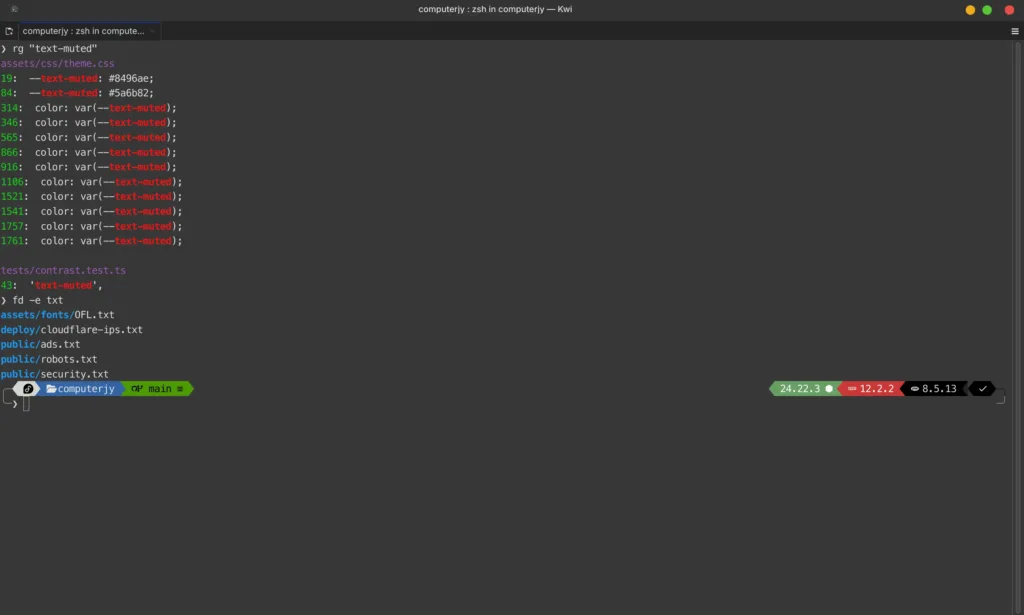
ripgrep searches the contents of files for a word or pattern, like grep -r, but it’s built for codebases. By default it respects your .gitignore and skips hidden and binary files, so searching a web project doesn’t drown you in matches from dependencies and build output.
I use it every day on my Fedora 45 KDE laptop. It’s the first thing I install on a new system.
# Find every TODO in the current project
rg TODO

# Only search TypeScript files, case-insensitive
rg -i "fetchuser" -t ts

# Include ignored and hidden files when you really need them
rg -uu "API_KEY"
If you’ve ever typed grep -rn --exclude-dir=node_modules, rg does that for you out of the box.
fd: find Without the Manual
find is powerful, but its syntax is easy to forget. Finding a file by name means writing find . -name "*report*". With fd, it’s fd report.
fd also uses smart case: lowercase searches ignore case, and adding a capital letter makes the search case-sensitive. Like ripgrep, it skips hidden files and anything in .gitignore unless you ask for them. I use it daily alongside rg.
# Find files with "report" in the name
fd report

# Find all PDFs
fd -e pdf

# Include hidden and ignored files
fd -H -I config
There’s one Ubuntu and Debian quirk to know. The package is called fd-find, and the command is fdfind, because another package already took the name fd. fd’s README suggests a symlink so you can type fd:
mkdir -p ~/.local/bin
ln -s $(which fdfind) ~/.local/bin/fd
bat: cat With Syntax Highlighting
bat shows a file’s contents like cat, but with syntax highlighting, line numbers, and a margin that marks lines you’ve changed in Git. Long files open in a pager, so you can scroll instead of watching text fly past.
The clever part is that bat behaves like plain cat when you pipe its output into another command. Your pipelines don’t break.
# Read a config file with highlighting
bat ~/.bashrc

# Show only lines 20 to 40
bat -r 20:40 app.ts
On some Ubuntu and Debian releases, the command is batcat for the same naming reason as fd. Check with bat --version, and if that fails, the same symlink trick works.
eza: ls With Git Status and Icons
eza lists files like ls, with color-coded file types, readable sizes, a built-in tree view, and a column showing each file’s Git status. It took over from exa, an older Rust ls replacement that stopped being maintained.
# Long listing with Git status
eza -l --git

# Directory tree, two levels deep
eza --tree --level=2

# Icons, if your terminal font supports them
eza -l --icons=auto
Fedora and Arch ship eza in their main repositories. For Ubuntu and Debian, eza’s install guide points to a separate repository run by one of its maintainers. That’s an extra source of packages to trust, so decide whether a nicer ls is worth it on that machine.
zoxide: cd That Remembers Where You Go
zoxide is the one I’d miss most. It remembers the directories you visit and ranks them by how often and how recently you use them. After that, z blog takes you to the folder you use most that matches “blog,” wherever it lives.
# Jump to your most-used directory matching "blog"
z blog

# Narrow it down with more than one word
z work api

# Pick from a list (needs fzf installed)
zi
zoxide needs one line in your shell config before it works. For Bash, add this to the end of ~/.bashrc:
eval "$(zoxide init bash)"Zsh uses zoxide init zsh (placed after compinit), and Fish uses zoxide init fish | source. If you want zoxide to take over cd itself, add --cmd cd to the init line. I’d start with z so you learn when it guesses right and when it doesn’t.
Pro Tip: Put aliases like
alias cat=batoralias ls=ezain your interactive shell config only, never in scripts. Scripts expect the classic tools and their exact flags and output. A script that suddenly gets eza’s output instead oflscan fail in confusing ways.
uv: One Fast Tool for Python Packages
uv is the odd one out because it doesn’t replace a Unix classic. It replaces Python’s messy toolbox. According to uv’s README, it covers what used to take pip, pip-tools, pipx, poetry, pyenv, virtualenv, and more. Astral, the company behind it, says it’s 10 to 100 times faster than pip. That’s their benchmark, not mine, but the difference is obvious the first time you install a big project’s dependencies.
I use it for my Python work, and it’s the reason I no longer think about which Python version or virtual environment a project needs.
# Create a virtual environment in .venv
uv venv

# Install a Python version
uv python install 3.13

# Run a Python command-line tool without installing it
uvx ruff check .
Fedora and Arch package uv in their official repositories. Elsewhere, Astral’s documentation offers a standalone installer (curl -LsSf https://astral.sh/uv/install.sh | sh) or pipx install uv. Piping a script from the internet into your shell is convenient, so open the URL and read it first if that habit bothers you.
One piece of context: in March 2026, OpenAI announced it would acquire Astral and fold the team into Codex. Both companies said uv stays open source, and its permissive license means it could be forked if that changes. It’s still worth knowing who owns a tool your projects depend on.
sudo-rs and uutils: Rust Moves Into the System Itself

Everything above is optional. These two are different, because some distros now install them by default.
sudo-rs is a Rust rewrite of sudo, the command that runs things as an administrator. uutils coreutils is a Rust rewrite of GNU coreutils, the basic commands like ls, cat, cp, and mv that almost every script depends on.
Here’s where things stand in November 2026:
- Ubuntu made sudo-rs the default in 25.10, after Canonical announced the switch as a test run before 26.04 LTS.
- Ubuntu 26.04 LTS ships uutils as its default core utilities, with one exception. Canonical’s April update says
cp,mv, andrmstay on GNU for now because of unresolved timing bugs that could damage data. Canonical is aiming for full uutils in 26.10. - Fedora packages both
sudo-rsanduutils-coreutils, but neither is the default. Its latest uutils update says outright that there’s no plan to make it the default for now.
On Ubuntu, you’ll notice a few differences in sudo-rs. It shows asterisks while you type your password, a login in one terminal doesn’t carry over to another, and some rarely used features are gone, such as sudo -E and LDAP-based rules. Most home users will never hit them.
My advice: don’t swap these by hand. Rewriting sudo and coreutils is a job for distro maintainers, who can test against thousands of packages and scripts and give you a supported way back. Doing it yourself on Fedora or Arch gets you the risk without that safety net.
If you’re on Ubuntu and something breaks, check which version you’re running first:
ls --version
sudo --version
If a sudo-rs difference blocks you, Ubuntu still ships the original as sudo.ws, and you can switch back with sudo update-alternatives --set sudo /usr/bin/sudo.ws. Reverting coreutils is messier, since some packages depend on the uutils version, so report the bug instead of ripping it out.
Install All Six Rust CLI Tools at Once
If you just want the lot, here’s one command per distro.
Fedora:
sudo dnf install ripgrep fd-find bat eza zoxide uvArch Linux:
sudo pacman -S ripgrep fd bat eza zoxide uvUbuntu and Debian:
sudo apt install ripgrep fd-find bat zoxideThen add eza from its repository if you want it, and install uv with the official installer or pipx. Remember the fdfind and batcat names on these systems.
To undo any of it, uninstall the package with your package manager and delete the zoxide line or any aliases from your shell config. Nothing here touches system files.
Frequently Asked Questions
Are Rust CLI tools safe to use alongside the originals?
Yes. ripgrep, fd, bat, eza, zoxide, and uv install as separate commands. grep, find, cat, ls, and cd stay exactly as they were, so scripts keep working.
Should I alias grep to rg?
Not in scripts. In your interactive shell it’s your call, but the flags differ, so muscle memory from grep won’t always carry over. Typing rg is short enough that I’d skip the alias.
Does uv replace pip completely?
For most everyday work, yes. It creates virtual environments, installs packages, manages Python versions, and runs command-line tools. Some projects still document pip commands, and uv’s uv pip interface accepts most of them.
Is my distro using sudo-rs?
Run sudo --version. On Ubuntu 25.10 and later, the default is sudo-rs. Fedora and Arch still use the original sudo unless you installed sudo-rs yourself.
Start With Two
If six new commands sounds like a lot, install ripgrep and zoxide first. One changes how you search, the other changes how you move around, and both pay off on day one.
The system-level Rust rewrites will arrive on their own schedule, tested by people whose job is testing them. The tools you choose yourself are already here.